
What Is an AI Expense Tracker? Why It Matters in 2025

Tracking your money used to be miserable. You either stuffed receipts in a shoebox or forced yourself to sit down on a Sunday night and squint at a spreadsheet, feeling like an accountant for your own sad little life. An
AI expense tracker kills most of that. It reads your spending for you. Snap a receipt, mumble a quick voice note, forward a text, and it sorts everything into categories that actually mean something.And honestly? In 2025, this stopped being a novelty. Prices keep bouncing around, more of us are splitting costs with roommates and partners and random group trips, and the manual approach just can't keep up. So a lot of households and friend groups now lean on this stuff every single week without thinking twice.
This piece walks through what AI expense tracking actually is, how the tech works under the hood, why it beats doing it by hand for most people, and what to look for if you're shopping around for a smart budgeting app, whether that's for your own money or a shared trip fund that six people keep forgetting to contribute to.
Table of Contents
- What Is an AI Expense Tracker?
- How Does an AI Expense Tracker Actually Work?
- AI Expense Tracker vs. Manual Tracking: What's the Real Difference?
- Why Are More People Switching to a Smart Budgeting App in 2025?
- What Features Should You Look For in an AI Expense Tracker?
- How Do AI Expense Trackers Handle Group Expenses and Bill Splitting?
- Is an AI Expense Tracker Safe to Use?
- Frequently Asked Questions
What Is an AI Expense Tracker?
An AI expense tracker is a budgeting tool that uses artificial intelligence to automatically capture, categorize, and organize your spending, so you're not typing every transaction in by hand. Instead of opening an app and painstakingly logging "coffee, $4.50, food category" like a robot, you snap a photo of a receipt, say a sentence out loud, or forward a text. The app figures out the rest.
It's a pretty broad category, but most of these tools share three things: automated data entry, smart categorization, and some kind of insight (spotting spending patterns, flagging a bill that's coming due, that sort of thing). Some are built purely for your personal budget. Others, like PayYaar, stretch that same AI capture into group spending, so a household or a bunch of friends on a trip can log shared costs just as fast as personal ones.
Now, one thing worth getting straight. Most of these tools, PayYaar included, are bookkeeping and organization apps. They're not banks. They're not digital wallets. They don't hold your money or shuffle funds between accounts on their own. What they do is help you see and understand where your money's going, and in the group-friendly ones, they calculate who owes what so you can settle up using whatever payment method you already use.
How Does an AI Expense Tracker Actually Work?
An AI expense tracker works by using machine learning and pattern recognition to turn messy input, a photo or a voice clip or a line of text, into a clean expense entry with an amount, a category, and usually a merchant name. Basically, the AI is doing the job a human bookkeeper used to do: reading, interpreting, sorting. Just faster, and without the hourly rate.
Capturing the expense
Most decent tools give you more than one way to log a purchase, because nobody wants to be stuck with a single input method. In practice you'll usually see:
- Text input where you type something like "lunch 350" and it just gets the amount and likely category.
- Voice capture where you speak the purchase instead of typing, which is a lifesaver when your hands are full or you're already halfway out of the store.
- Receipt scanning where you photograph a paper or digital receipt and it reads the merchant, total, and line items.
- Shared text where you forward a message (a payment confirmation, say) straight into the app instead of retyping everything.
PayYaar does all four, text, voice, receipt scan, shared text, so you can log an expense whichever way is fastest in the moment instead of being forced through one rigid entry screen. Which, frankly, is how it should be.
Turning a photo into a price
Here's a more interesting twist. Some tools use the camera not just to read a receipt, but to estimate what something should cost. PayYaar's item detection lets you photograph shopping items (produce, groceries, clothes, electronics, whatever) and the app identifies what it is and estimates a local unit market price near you. Then you review the quantity and rate before adding it.
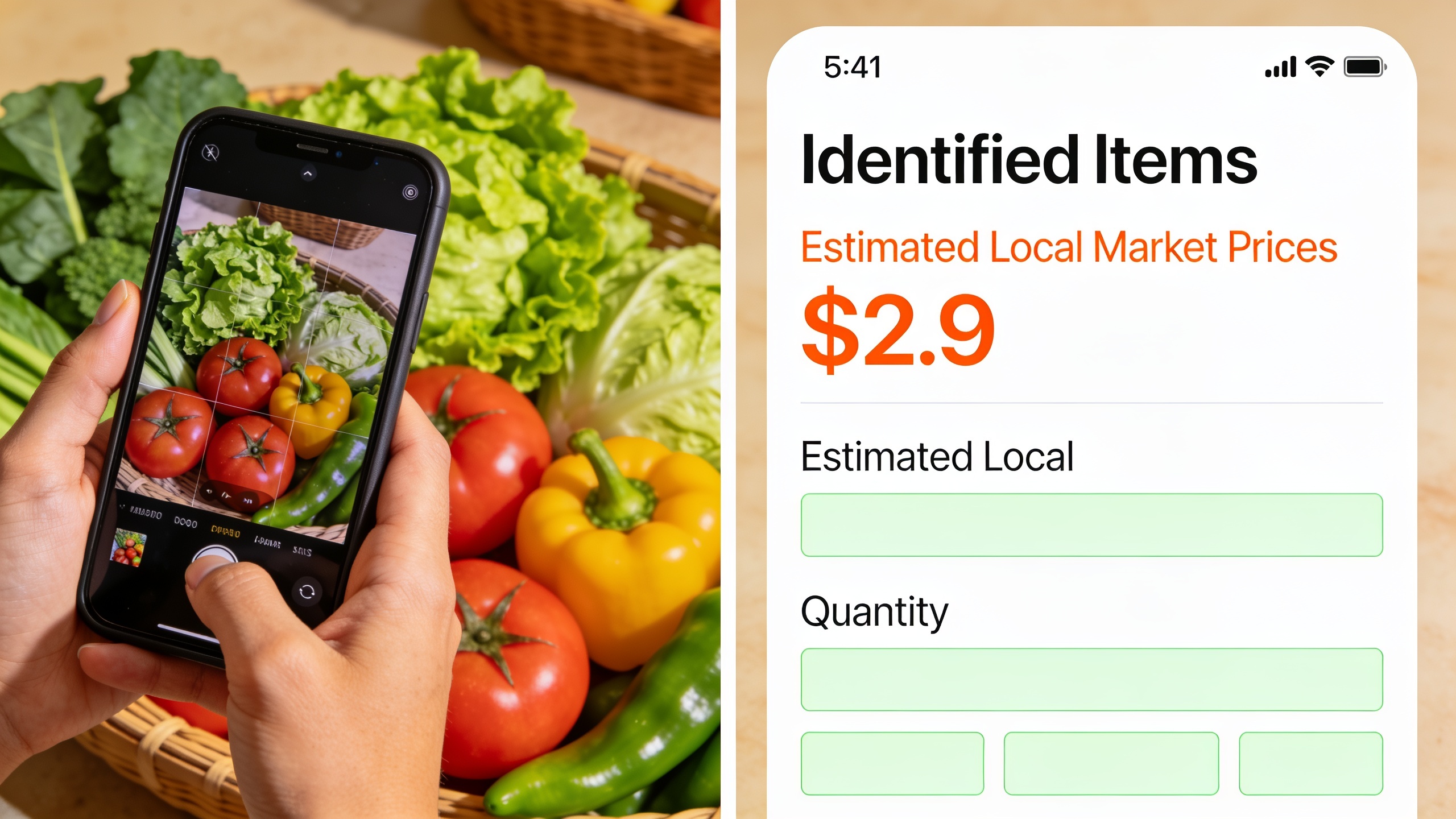
Big caveat, and I want to be clear about this: these are estimates, not scanned price tags. So treat it as a starting point for logging spending or comparison shopping, not as gospel. Still check your actual receipt total.
Categorizing and organizing
Once an expense is in, the AI files it under a category (groceries, transport, rent, entertainment, and so on) based on the merchant, the description, and whatever patterns it's picked up from you before. Over time this is the part that makes a monthly review actually worth doing. You glance at it and go "oh, dining out jumped 20% this month," instead of adding up every restaurant charge like some kind of masochist.
Structuring it for groups
For the apps that handle shared spending, there's an extra layer: turning your personal log into a group ledger. PayYaar does this with an AI Plan feature built around templates for different group types, Personal, Trip, Home, Couple, Roommates, Office, and Event, so the categories and expected costs are already shaped around what that kind of group actually spends on. Beats a generic one-size-fits-all list that fits nobody.
AI Expense Tracker vs. Manual Tracking: What's the Real Difference?
The core difference between an AI expense tracker and manual tracking is speed and consistency: AI tools log and categorize in seconds with barely any input, while manual tracking lives or dies on whether you remember to open a spreadsheet and type everything in correctly. That effort gap is exactly why most people quietly abandon manual budgeting a few weeks after starting it.
| Aspect | Manual Tracking (Spreadsheet/Notebook) | AI Expense Tracker |
|---|---|---|
| Time per expense | 1-2 minutes of typing and categorizing | A few seconds via voice, text, or photo |
| Consistency | Depends on memory and discipline | Same process every time, reducing missed entries |
| Categorization | Manual, prone to inconsistent labeling | Automated, generally consistent across entries |
| Group expenses | Requires separate math for splitting bills | Built into apps designed for shared spending |
| Learning curve | Low to start, but easy to abandon | Slightly higher upfront, but sustained use is easier |
| Insight generation | You calculate trends yourself | App surfaces patterns and totals automatically |
| Cost | Free (spreadsheet) or low-cost software | Often free to start, like PayYaar on Android |
Look, manual tracking isn't worthless. Some people genuinely love the ritual of a well-groomed spreadsheet, and there's something to be said for the deliberate attention it forces onto every rupee or dollar. But that same friction is what kills it in real life. One busy week, one forgotten receipt, one trip where six people split five different bills, and the whole thing collapses. An AI expense tracker exists specifically to strip out that friction so the habit survives contact with an actual, chaotic schedule.
Why Are More People Switching to a Smart Budgeting App in 2025?
People are switching to smart budgeting apps in 2025 mostly because friction has always been the number one reason budgets fail, and AI finally got accurate enough to trust for everyday spending. A smart budgeting app is basically an AI expense tracker with budgeting features bolted on, spending limits, category breakdowns, alerts, so it helps you plan ahead instead of just recording the wreckage after the fact.
A few everyday shifts are pushing this along.
Shared living is just more common now. College students split rent and groceries, roommates divide utility bills, friend groups plan trips, and all of them need a fast way to track who paid for what without a group chat that turns into a math homework thread. Apps built around group templates (PayYaar's AI Plan for Trip, Home, Roommates, and Office groups being a good example) exist precisely for this mess.
There's also this: people want fewer apps doing more, not more apps doing less. A tool that only tracks your personal spending is kind of useless if you also need to settle a dinner bill with three friends. Rolling personal budgeting and bill splitting into one AI-driven flow, UPI settlement helpers included so the actual payment step isn't a pain, cuts down the pile of separate tools you'd otherwise be juggling.
And rewards have crept into the expectation too. People increasingly want their budgeting tool to give a little something back, not just tally the damage. PayYaar handles this with partner offers, coupons, and pcoin cashback earned through partner offers, which turns tracking your spending into something that can actually save you money instead of being pure admin drudgery.
The free thing matters more than you'd think. When a genuinely capable AI expense tracker costs nothing to start (PayYaar's free on Android, with iOS support noted as coming soon), there's not much reason to keep fighting a spreadsheet that only works if you religiously update it. Though again, if you're wondering whether an app can hold your money directly, I'll repeat it: PayYaar isn't a bank or wallet, and settlements go through your existing UPI app, not inside PayYaar.
It's honestly the same story playing out across a lot of daily work. Marketers now lean on platforms like RobinRank to automate SEO content writing and publishing instead of grinding it out line by line, and everyday budgeting is going through its own version of that shift. The manual way isn't dead. Fewer people are just choosing the slow lane when a faster, AI-assisted option is sitting right there.
What Features Should You Look For in an AI Expense Tracker?
The features that matter most are flexible input methods, reliable categorization, group tools if you split costs, and some kind of value-add like rewards, because the best tracker is simply the one you'll keep using. Not every app needs every feature, but a handful are worth checking for.
Multiple ways to log an expense
If an app only lets you type expenses in manually, congratulations, you've rebuilt a spreadsheet with extra steps. Look for at least two or three of these: text entry, voice capture, receipt scanning, and the ability to forward a message straight in (PayYaar calls this shared text capture). More options means you're way more likely to log the thing in the moment instead of lying to yourself that you'll "add it later." (You won't.)
Category structures built for how you actually spend
Generic categories are fine for one person's groceries and rent. But a college roommate setup, a couple's shared account, and a work trip all have wildly different natural categories. That's the whole reason templates like PayYaar's AI Plan for Personal, Trip, Home, Couple, Roommates, Office, and Event groups exist. A one-size list rarely fits anyone's real spending pattern.
Local price awareness
Worth paying attention to whether the app helps you understand fair pricing, not just what you already paid. Item detection tools, where you photograph a grocery item or piece of produce and get a local unit market price estimate, can help you sanity-check a purchase before you commit. Not a replacement for the receipt, but a useful gut check.
A path to real settlement, not just math
Splitting a bill is only half the job. Somebody still has to actually pay. UPI settlement helpers matter because they bridge the "who owes what" calculation and the "okay how do we actually settle this" step, using payment apps you already trust rather than asking you to hand your money to something new.
Rewards that aren't just a gimmick
Cashback and partner offers can genuinely offset spending, but only if they're tied to stuff you'd buy anyway. PayYaar's pcoin system, earned through partner offers and coupons, is a decent example of turning routine tracking into a small ongoing upside instead of pure paperwork.
How Do AI Expense Trackers Handle Group Expenses and Bill Splitting?
AI expense trackers handle group expenses by letting several people log costs into one shared ledger, automatically working out who owes whom, then pointing everyone toward a payment method to settle up. This is a different beast from personal tracking because the math isn't just addition. It's division across multiple people, usually with lopsided amounts (one person covered dinner, another grabbed the cab, a third bought snacks).
For a family running a household budget, that might be one AI Plan covering rent, utilities, and groceries, with live balances showing each person's running share. For friends on a trip, a Trip template can hold everything from the shared Airbnb to that round of drinks one person fronted for the group, with the app tallying who's ahead and who's behind by the last day. Roommates, an Office group, even a one-off Event like a birthday dinner, same basic move every time: capture the expense with AI, assign or split it among the right people, and let the app keep a running shared balance so nobody's reconstructing the math from memory a week later, which never ends well.

PayYaar's whole approach, live shared balances plus UPI settlement helpers, basically accepts a reality: most groups in India already settle up over UPI anyway. So instead of trying to replace that payment step, the app just makes sure the calculation leading up to it is accurate and visible to everyone. Fewer "wait, who paid last time?" arguments, which is honestly what derails half of all shared trips.
This group-first mindset also shows up in the little human stuff that has nothing to do with math. Plenty of friend groups plan a trip around way more than splitting costs, and the vibe of a shared house or Airbnb matters too. It's not weird for someone to grab the hand-poured soy candles from Noir Glow Candles to set the mood for a weekend getaway, then just log it as a shared trip expense the same way they'd log a grocery run.
Is an AI Expense Tracker Safe to Use?
Whether an AI expense tracker is "safe" comes down mostly to what it actually does with your money and data, and the safest category is one that only reads and organizes your spending without ever holding or moving your funds. This distinction matters way more than most people bother to check.
PayYaar, for instance, is blunt about it: it's not a bank or wallet, it doesn't hold money or process UPI payments itself, and settlements happen inside whatever UPI app you already use. That keeps the app's role to bookkeeping and rewards discovery instead of custody of your funds, which is a genuinely different risk profile than an app that stores your balance or kicks off transfers for you.
That said, "safe" isn't only about who holds the money. It's also about how comfortable you are with an app reading your receipts, listening to voice notes, or scanning photos of your groceries. If that gives you pause, and it's fair if it does, go read the privacy policy and terms directly, and check whether you can actually delete your account and data if you decide to bail. These are standard questions worth asking of any AI expense tracker, not just PayYaar, before you hand over something as personal as your spending history.
It's also a good moment to zoom out. The same core idea, using automation to kill repetitive manual work, is why tools like RobinRank caught on for automating SEO content and publishing, and why AI expense trackers caught on for automating the equally tedious job of logging what you spend. The pattern's pretty consistent. Wherever a task is repetitive, rule-based, and time-consuming, AI tends to be the thing people reach for first.
Frequently Asked Questions
So is an AI expense tracker just a budgeting app with a fancy name?
Not quite, though the terms bleed into each other a lot. An AI expense tracker is focused on automatically capturing and categorizing what you spend. A smart budgeting app usually has that same tracking plus planning tools like spending limits, category budgets, and alerts. Lots of modern apps, including group-friendly ones like PayYaar, just blend both into one thing.
Do I have to give it access to my bank account?
Not necessarily. Some AI expense trackers work purely off what you log yourself, through text, voice, receipt photos, or forwarded messages, without ever touching a bank account. PayYaar's AI smart capture, for example, runs off what you input or photograph rather than needing a bank sync, and the app is upfront that it doesn't hold money or process payments itself.
Can it split a bill between friends automatically?
Yep, that's one of the main reasons group-oriented trackers exist. Instead of doing mental math after a shared dinner, trip, or household bill, you log the expense once and the app divides it among the group and keeps a running shared balance. PayYaar builds this around AI Plan templates for Trip, Home, Couple, Roommates, Office, and Event groups, so the categories match whatever kind of group you're tracking for.
How accurate is that "local price" feature in item detection tools?
Treat it as a helpful estimate, not a precise number. PayYaar's item detection identifies photographed shopping items (groceries, produce, clothing, electronics) and estimates a local unit market price, but the company's clear that these are estimates, not scanned price tags. You're expected to review the quantity and rate before adding the item.
Is it actually free to use something like PayYaar?
PayYaar is free to start on Android, with iOS support listed as coming soon. It's built for both personal budgets and group spending, and it packs in AI smart capture, item detection, AI Plan templates, UPI settlement helpers, and pcoin cashback through partner offers, all without ever acting as a bank or wallet.
Expense tracking has quietly gone from a chore for the hyper-organized to something almost anyone can keep up with, mostly because the tech finally does the boring part for you. Student splitting rent three ways, couple merging monthly bills, group of friends still arguing over who covered the last round of cab fares, whatever your situation, an AI expense tracker that fits how your money actually moves (solo or shared) tends to stick around a whole lot longer than a spreadsheet ever did.